Wi-Fi 5 vs Wi-Fi 6: How are they different? Which is best for Pakistani homes and offices
Learn the key differences between Wi-Fi 5 and Wi-Fi 6 and discover which wireless technology is best for Pakistani homes and offices in 2026.
Written by
Dreams Network & Technology
0
Views
5
Likes
0
5
7 min read
Introduction
Internet usage in Pakistan has grown significantly in recent years. Whether it is remote work, e-learning, cloud ERP systems or surveillance cameras, people now require reliable Wi-Fi in homes and offices.
When upgrading a router or creating a new network, you have likely heard the terms Wi-Fi 5 and Wi-Fi 6. But what do these generations really mean, and which one is best for Pakistani homes and offices in 2026?
In this guide, Dreams Network & Technology explains the major differences, real benefits and practical recommendations based on Pakistani network environments.
What Do Wi-Fi Generations Mean?
Wi-Fi generations are based on IEEE wireless standards:
- Wi-Fi 5 ? 802.11ac
- Wi-Fi 6 ? 802.11ax
Each new generation improves:
- Speed
- Network efficiency
- Device capacity
- Latency
The biggest improvement in modern Wi-Fi standards is not just speed, but the ability to efficiently handle many connected devices.
Wi-Fi 5 (802.11ac)
Wi-Fi 5 became common in Pakistan between 2016 and 2020 and many homes still use Wi-Fi 5 routers.
Key Features
- Uses the 5 GHz band
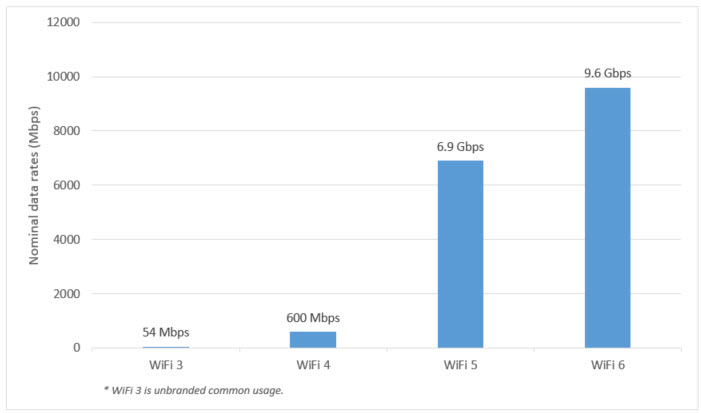
- Maximum theoretical speed up to 3.5 Gbps
- Supports MU-MIMO for multiple devices
Advantages
- Affordable routers
- Reliable for small homes
- Works well with 10-20 devices
Limitations
- Performance drops with many connected devices
- Less efficient in crowded networks
Best For
Small homes, apartments and budget Wi-Fi setups in Pakistan.
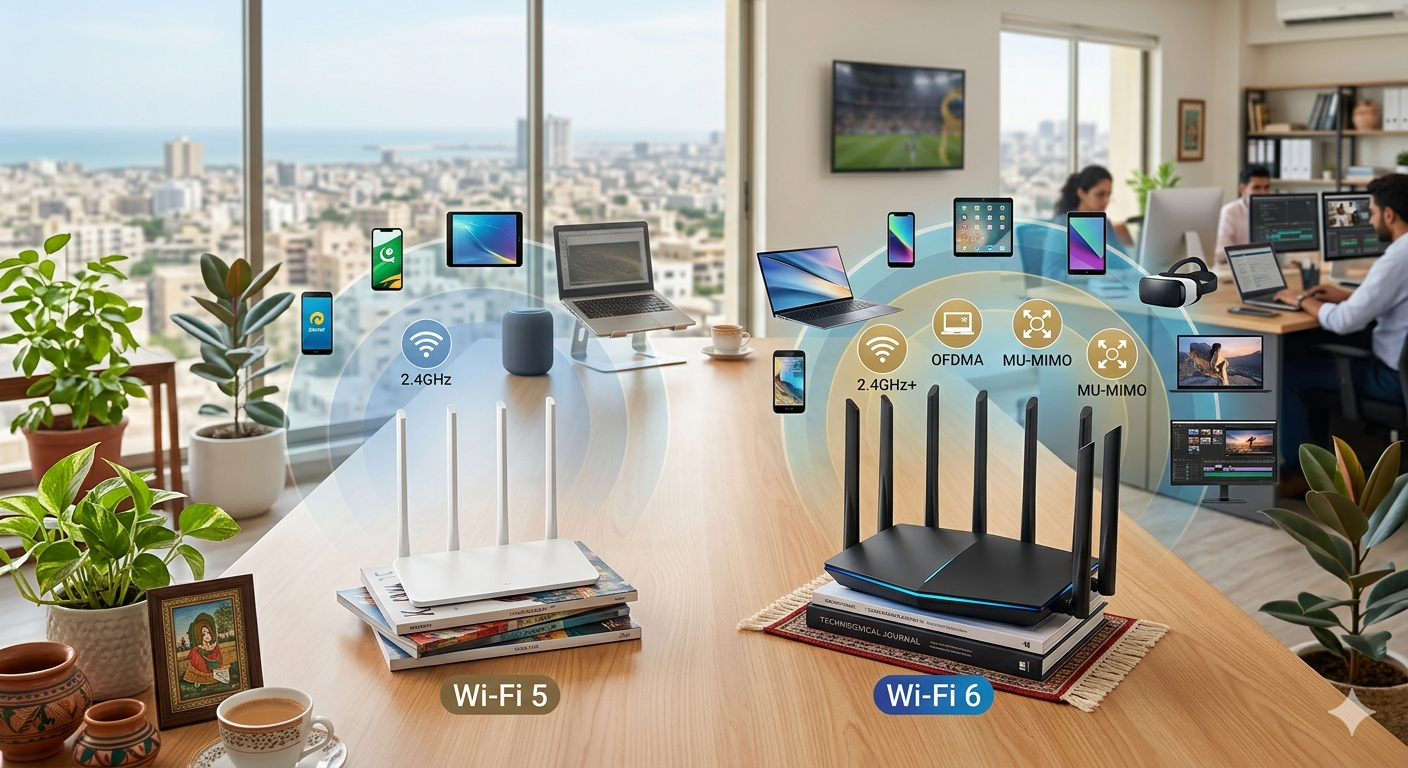
Wi-Fi 6 (802.11ax)
Wi-Fi 6 is designed for modern environments where dozens of devices compete for bandwidth.
Key Features
- Supports 2.4 GHz and 5 GHz
- Maximum theoretical speed up to 9.6 Gbps
- Uses OFDMA technology
- Improved MU-MIMO performance
- Lower latency
Real Benefits in Pakistan
In cities such as Karachi, Lahore and Islamabad, Wi-Fi congestion is common. Wi-Fi 6 improves performance by:
- Maintaining stable Zoom and Teams calls
- Improving 4K streaming performance
- Supporting multiple CCTV cameras
- Handling smart home devices efficiently
Advantages
- Handles 30-50+ devices smoothly
- Reduced gaming latency
- Better performance in dense environments
- Future-ready investment
Best For
Medium to large homes, schools, clinics and offices.
Comparison Overview
| Feature | Wi-Fi 5 | Wi-Fi 6 |
|---|---|---|
| Frequency | 5 GHz | 2.4 & 5 GHz |
| Max Speed | 3.5 Gbps | 9.6 Gbps |
| Device Capacity | Moderate | High |
| Ideal Use | Homes | Homes & Offices |
| Cost | Low | Medium |
Best Wi-Fi for Pakistani Homes
- Internet below 50 Mbps ? Wi-Fi 5
- 50-150 Mbps with multiple devices ? Wi-Fi 6
- 200 Mbps+ fiber ? Wi-Fi 6 or Wi-Fi 6E
For most families, Wi-Fi 6 provides the best balance between cost, performance and future-proofing.
Best Wi-Fi for Pakistani Offices
Office networks typically handle:
- VoIP phones
- CCTV cameras
- Cloud ERP systems
- Video conferencing
- File sharing servers
- Small office (10-15 users) ? Wi-Fi 6
- Medium office (20-50 users) ? Wi-Fi 6 recommended
- Large enterprise ? Wi-Fi 6E
Why Choose Dreams Network & Technology
Dreams Network & Technology provides:
- Professional Wi-Fi site surveys
- Enterprise-grade router deployment
- Structured cabling solutions
- Network optimization for homes and offices
- Scalable infrastructure for growing businesses
Learn more:
Final Recommendation
- Best Budget Option ? Wi-Fi 5
- Best Overall Choice ? Wi-Fi 6
Wi-Fi 6 is the smartest long-term investment for most Pakistani homes and businesses. Upgrading Wi-Fi is not only about speed — it is about productivity, stability and future-proof networking.
Contact Dreams Network & Technology
- Website:www.dreamsnw.com
- Email:sales@dreamnw.com
- WhatsApp:Chat on WhatsApp
- Phone:(021) 111 111 368